
CUR8R Local Media Metadata and File Organization
A media collection rarely stays in the same folders forever. CUR8R keeps its catalogue locally and is designed to reconnect moved or renamed files with their tags and ratings.
Eventually, a folder called New Folder stops being a good home for several years of photographs. You tidy it up, split it by year, move some video to another drive, and give a few files names that mean something.
That is normal maintenance. If you have already spent time tagging the collection, you want the catalogue to keep making sense afterwards.
The file and the catalogue have different jobs
CUR8R keeps its library metadata in a local SQLite database. Your tags, people, ratings, and titles belong to that catalogue. They are not written into your original media files unless you choose to do so.
That distinction is useful when you want to organise a collection without changing every source file. It also explains why the library data matters: the folder containing your photographs is not, on its own, a copy of all the organising you have done.
When backing up a collection, keep the CUR8R library data as well as the media. The files and the catalogue are both worth having.
Rescanning should recognise familiar files
CUR8R's rescanning skips unchanged files, so a routine scan does not have to do all the original work again. It also uses file tracking and content hashes to recognise moves and renames and match files back to their existing metadata.
The aim is to let you reorganise your folders while keeping the tags and ratings attached to the right media. A filename is useful information, but it should not be the only thing the catalogue knows about a file.
If you are planning a large reorganisation, a backup and a small trial move are sensible starting points. Move a handful of files, rescan, and check the result before tackling the rest of the collection.
Useful information, close at hand
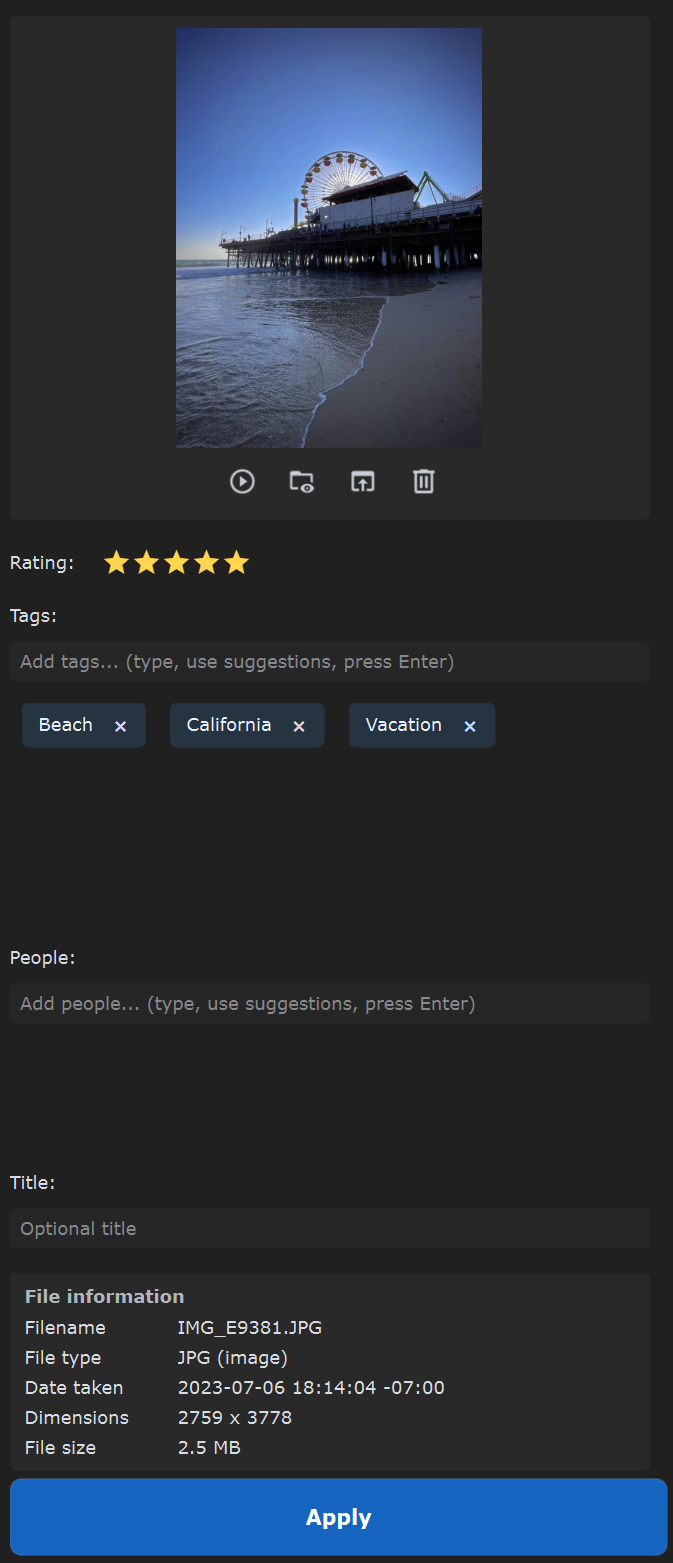
The Inspector panel brings the catalogue and file details together. Select an item to see its tags and rating alongside details such as media type, dimensions, size, duration where applicable, and the recorded date taken.
You can check what something is without opening a separate application for every item. Scanning and thumbnail work run in the background, and the collection stays on your computer throughout.
CUR8R runs offline on Windows and is free and open source. The project page has screenshots, downloads, and a link to the source if you want a closer look at how it works.