
Replay and Export GPS Tracks with Panko Track
A recorded route can be a memory, a comparison, or a file for another tool. Panko Track lets you replay a trip and export it as GPX, KML, or CSV.
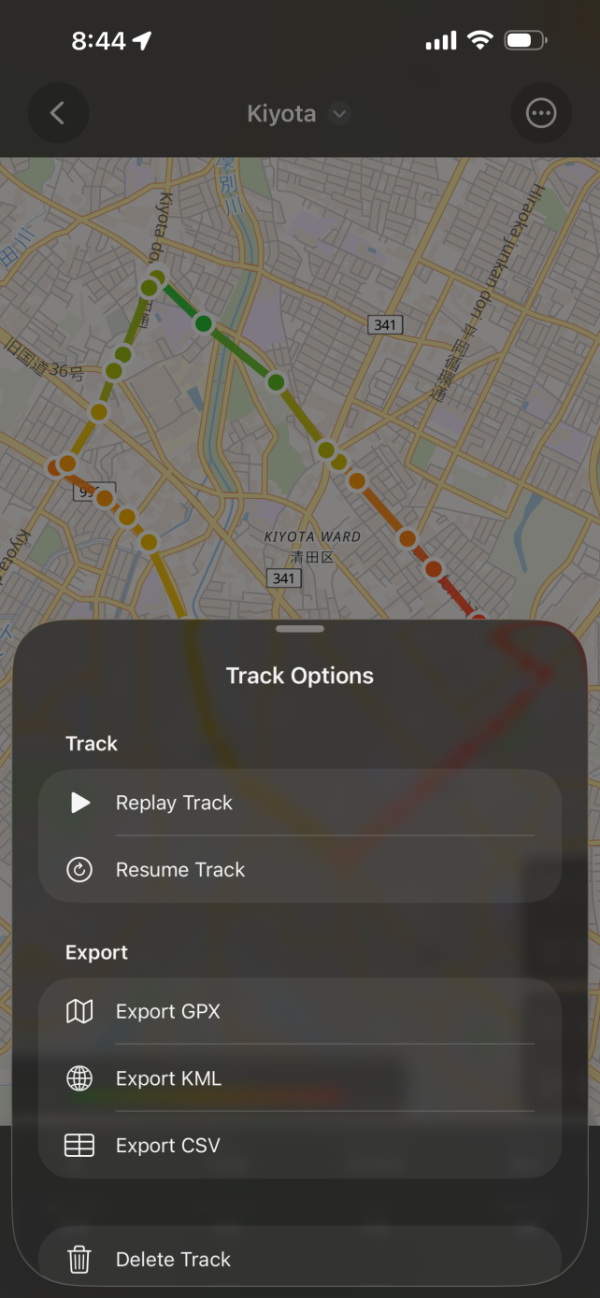
The walk is over, your shoes are off, and the line on the map is still there. Sometimes that is all you wanted: a record of where the afternoon went.
Other times, you want to do something with it. Revisit a turning you do not quite remember. Compare a familiar route with another attempt. Send the track to somebody who asked where you went.
Look at the route again
Panko Track keeps your recorded sessions on your device, and its track options include replay. Seeing a route unfold again is a different way to revisit a trip from looking at the complete line all at once.
You can also colour tracks by speed or elevation. That gives you another way to look through the record: where the pace changed, or where the route gained and lost height. On supported hardware, Panko Track uses the barometer for elevation data.
If you take the same route regularly, Ghost Track lets you load a previous route and compare against it in real time on a new outing. You can use an earlier effort as a reference without joining a public leaderboard.
Choose a format for what comes next
Export is available in three formats:
- GPX is a useful starting point when another route or outdoor app asks for a GPS track.
- KML suits viewing a route in mapping tools such as Google Earth.
- CSV gives you a tabular file to open in a spreadsheet or use in your own analysis.
The receiving tool decides which formats and fields it can use, so check its import options first. You do not have to commit to one format permanently; choose the one that fits the job.
Keep the choice to yourself
A route can reveal a fairly personal slice of a day. Panko Track stores it locally, and exporting is something you choose to do. You can keep a private copy, send a particular session, or simply leave it in your history.
That flexibility matters even if you never plan to analyse a single number. Having an export means the record can go with you when you want to use another tool.
You can see the replay and export screens on the Panko Track page. The app is available for iPhone with an Apple Watch companion, with no account or subscription required.